I find it interesting the amount of disappointent many people have expressed about the forthcoming iPad digital tablet. The interesting part is the people expressing the disappointment, not the disappointment itself. Let me explain.
There are and always will be technophobes and Luddites who will have nothing good to say about any new technological widget. You know the ones, they tell how much they hate technology because they don't have phones or computers to send you their concern. These aren't the people who surprised me.
I'm talking about the people such as Bill Gates. He should know better. His concern is that the iPad does not have a physical keyboard or stylus input. This is from the guy who helped change computing from an enterprise to a personal activity. Bill, you are dating yourself. You're becoming a modern day Luddite. You and Steve Ballmer--iPod what's it good for; iTunes who is going to buy music at $.99 a song; and iPhone, no keys, no success. You guys just don't get it.
iPad is going to be a success for the simple reason that people don't know what it's good for. It is the rebirth of the hobbiest home computer. People will play with it and start using it for things that were never envisioned. Just look at the App Store. Who envisioned the iPhone as an important geology repository and reference tool? Who envisioned it as a news reporting tool completed with video editing capabilities?
Getting away from Apple for a moment, look at Twitter: Who envisioned it as a political tool for change? Who envisioned it as a live stream news feed?
Take YouTube. Who envisioned it as a stand-alone video entertainment service rather than an amateur video posting service? Who envisioned it as a political messaging tool? Who envisioned it as an important video news source?
Needless to say, the iPad will be hugely successful and it will be successful for reasons other than those Steve Jobs and his imagination shop originally intended. As Om Malik noted, the iPad is a blank slate limited only by our imaginations.
What say you?
Showing posts with label Twitter. Show all posts
Showing posts with label Twitter. Show all posts
Friday, February 12, 2010


Monday, May 11, 2009
TweetStack Not Ready for Primetime
I love Twitter. As such, anything that helps me organize tweets, write tweets, and view tweets is of interest to me. Having an iPhone means having a variety of Twitter applications to choose from. I have used Twitterlator, Twitterific, and finally settled on Tweetie. Up to the point of using Tweetie, I had used the free version of Twitterific. I migrated to Tweetie because it has a few more features, has a more pleasant user interface, and performs fast and flawlessly.
A few weeks ago I bought TweetStack because it advertised a great set of features--basically putting the Mac application TweetStack on your iPhone. The good news is TweetStack allows you to see which tweets are unread (a drawback that I pointed out to Tweetie awhile ago); allows you to group Twitter IDs to create information-specific "stacks;" and allows you to store keyword searches.
The bad news is that TweetStack is buggy and unstable. Their most recent release has fixed many problems and some stability issues, but it remains buggy. If I had to give an analogy, it would be Tweetie is a Mac and TweetStack is a PC--so much promise, yet such a failure in execution.
Keep your eye on TweetStack. But for now, it isn't ready for primetime.
A few weeks ago I bought TweetStack because it advertised a great set of features--basically putting the Mac application TweetStack on your iPhone. The good news is TweetStack allows you to see which tweets are unread (a drawback that I pointed out to Tweetie awhile ago); allows you to group Twitter IDs to create information-specific "stacks;" and allows you to store keyword searches.
The bad news is that TweetStack is buggy and unstable. Their most recent release has fixed many problems and some stability issues, but it remains buggy. If I had to give an analogy, it would be Tweetie is a Mac and TweetStack is a PC--so much promise, yet such a failure in execution.
Keep your eye on TweetStack. But for now, it isn't ready for primetime.
Thursday, January 22, 2009
iPhone Twitter Clients
I have been using Twitter on the iPhone since the first Twitter clients were released to the AppStore. In the one-and-a-half years since the iPhone's appearance, I have used most of the major clients available. Until recently, the Twitter clients on my iPhone simultaneously were:
Twitterific: Of the remainder mentioned above, up to recently my favorite has been Twitterific. I have used the free version since it first appeared in the AppStore. It provides a simple interface to view tweets in list view:
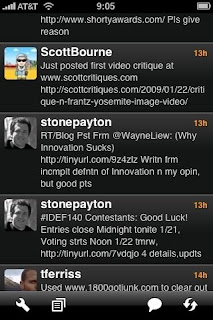
The view gives the message, the tweeter's badge, and how long ago it was sent--basically everything you need.
Twitterific also provides a detailed view providing the same information at a larger font, as well as buttons to reply, mark as favorite, switch to list view, check the tweeter's detailed identification information, refresh the tweets on the iPhone, and initiate a tweet.
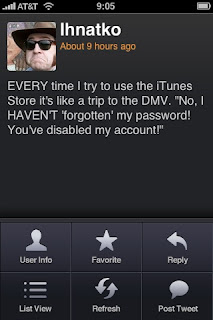
Twitterific's detailed information gives the name, userID, number of followers, location, bio of the tweeter.

It does not allow further drill-down.
Finally, the user can initiate a tweet with a window that allows typing with real-time character count (important with 140 characters of real estate), the ability to post a picture, and the ability to mark current location.
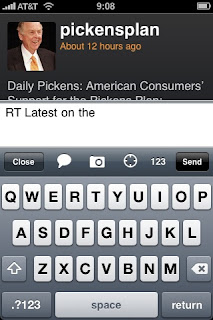
All-in-all, Twitterific has is good. However, since I link to a lot of Web pages in my tweets as well as re-tweeting a lot of information, I found these capabilities lacking--particularly the inability to have links automatically shrunk. Twitterific is free in the AppStore and the Premium version provides multiple account support for $9.99.
Twittelator: The second client that I have used heavily is Twittelator. I tried it out during the fall when I had a second Twitter account that I used frequently. I figured instead of upgrading to a client that could handle multiple accounts, it would be an opportunity to directly compare Twitter clients. Again, Twittelator provides a basic view screen. One difference is the screen will group senders together when their messages are sequential.
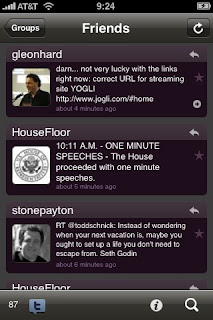
A key advantage of Twittelator over Twitterific is that the user can mark a tweet as a favorite (star) or reply (return arrow) directly from the list view screen. Also, touching the sender's badge will bring up the sender's detailed information.
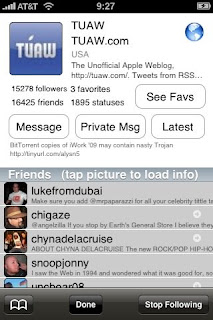
The detailed information available on the initial screen is comprehensive compared to Twitterific, including a list of followers as well as buttons to access the sender's favorites, initiate a reply, initiate a reply, and send a direct message.
Twittelator is a great product. My main complaint was the list screen with the grouping of tweets. For some reason, I found it more confusing than helpful. It is a good client. Twittelator is available free in the AppStore and a Pro version that provides multiple accounts is $4.99. For the differences in features of the upgraded versions, you get more for your money with Twittelator than Twitterific.
Twitterfon: The third client I used was Twitterfon. Of the three discussed to this point, I found Twitterfon to have the cleanest list view. First, it opens where you last viewed. While the others do the same, it can sometimes confusing which was the last tweet viewed. Not so with Twitterfon.
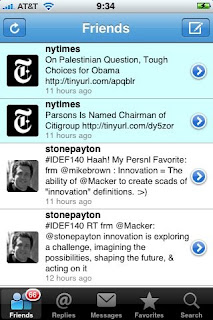

As the above image indicates, new messages that have not been viewed since last access are color-highlighted.
Tapping a tweet will bring up an abbreviated profile screen that provides the number of followers, the ability to reply, send a direct message, and re-tweet a message.

Since I often re-tweet messages that would be of interest to my followers, the re-tweet button is very handy. The detail screen also provides a button to bring up the tweeter's complete profile and a button to access the person's tweet timeline. Of the three mentioned so far, Twitterfon is the best of the lot. Twitterfon is free in the AppStore and there is no premium version. Therefore, if you are looking to support multiple accounts, you will need to look at other clients.
TwitterLink: The third client has very basic Twitter functionality. It's one claim to fame is that it installs a bookmarklet that will allow the user to view a Web page, shrink the URL, and automatically insert that URL into a TwitterLink message window.
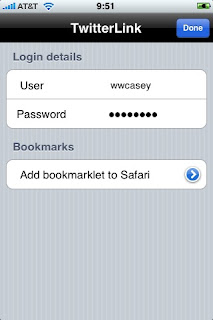
It was a major shortcoming of the previous three clients and I used TwitterLink just for that purpose. By using the easily installed bookmarklet, it was easy to send a shortened URL.
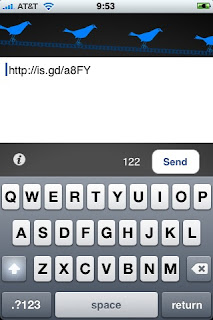
The big drawback is that TwitterLink is good at basic messaging only, it does not let you browse tweeters you are following. TwitterLink is free in the AppStore.
Tweetie: The final client is Tweetie. After much review and looking at recommendations on Twitter, it seemed that Tweetie was the most popular of the clients available for the iPhone. The list view screen is similar to others mentioned in this review--it is clean, carries the tweeter's badge and message. A major advantage of Tweetie over the others is the posting time is a date and time, not a relative time. I find this easier to determine whether a tweet is still relevant. My one complaint is that Tweetie does not highlight unread messages loaded since the last time the application was accessed.
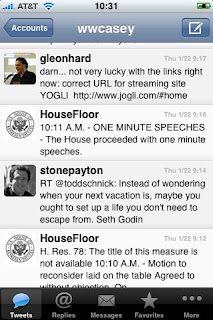
Tweetie provides two views: Basic, and bubbles (similar to the iPhone's SMS application). Views are selectable through Tweetie's settings in the iPhone Settings application.

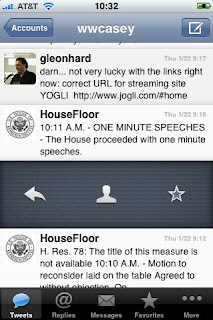
A second clean feature is swiping an entry brings up a menu that allows the user to rely, set the tweet as a favorite, or view the sender's profile.
The profile information is the most comprehensive of the clients reviewed.
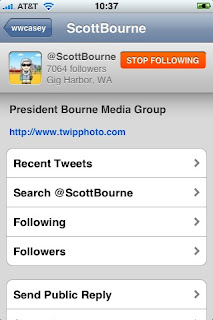
As the image above illustrates, the user can get about all the information they need on the tweeter, view their timeline, followers, who they are following, as well as send replies, direct messages, or block/unblock that individual (selections are off-screen at the bottom of the preceding image).
The message screen allows the user to insert a picture (much as the others, it uses twitpic.com), insert current location, and provides real-time characters remaining in the message. However, a great feature is the "More" button that provides access to some features not available in other clients.
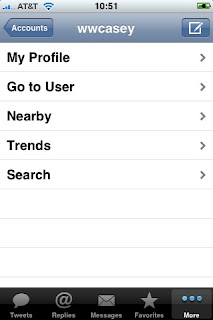
A major negative of Tweetie is that documentation is difficult to find. It is on the atebits.com Web, but you have to search for it. If the application had basic instructions on setting up multiple accounts, where you can find settings, and similar information, it would be very helpful.
Tweetie has a feature I have not seen in others except TwitterLink--using a bookmarklet, you can add a link to a message and the link is shrunk to save characters. However, finding out how to set up the bookmarklet can also be an adventure. It would be a great improvement if they provide a link to a Web site as done by TwitterLink that walks you through the set-up process, including the basic entry of the bookmarklet.
With that said, Tweetie seems to the be the best of the bunch and within striking distance of having features found favorable in other clients. Hopefully, these features will be made available in future releases. Tweetie does not have a basic free version, but is available for $2.99. For feature versus cost, it is the best of the clients reviewed here.
If you have information to add or insight into Twitter clients not covered in this post, please feel free to comment.
- Twitterific
- Twittelator
- Twitterfon
- TwitterLink
- Tweetie
Twitterific: Of the remainder mentioned above, up to recently my favorite has been Twitterific. I have used the free version since it first appeared in the AppStore. It provides a simple interface to view tweets in list view:

The view gives the message, the tweeter's badge, and how long ago it was sent--basically everything you need.
Twitterific also provides a detailed view providing the same information at a larger font, as well as buttons to reply, mark as favorite, switch to list view, check the tweeter's detailed identification information, refresh the tweets on the iPhone, and initiate a tweet.

Twitterific's detailed information gives the name, userID, number of followers, location, bio of the tweeter.

It does not allow further drill-down.
Finally, the user can initiate a tweet with a window that allows typing with real-time character count (important with 140 characters of real estate), the ability to post a picture, and the ability to mark current location.

All-in-all, Twitterific has is good. However, since I link to a lot of Web pages in my tweets as well as re-tweeting a lot of information, I found these capabilities lacking--particularly the inability to have links automatically shrunk. Twitterific is free in the AppStore and the Premium version provides multiple account support for $9.99.
Twittelator: The second client that I have used heavily is Twittelator. I tried it out during the fall when I had a second Twitter account that I used frequently. I figured instead of upgrading to a client that could handle multiple accounts, it would be an opportunity to directly compare Twitter clients. Again, Twittelator provides a basic view screen. One difference is the screen will group senders together when their messages are sequential.

A key advantage of Twittelator over Twitterific is that the user can mark a tweet as a favorite (star) or reply (return arrow) directly from the list view screen. Also, touching the sender's badge will bring up the sender's detailed information.

The detailed information available on the initial screen is comprehensive compared to Twitterific, including a list of followers as well as buttons to access the sender's favorites, initiate a reply, initiate a reply, and send a direct message.
Twittelator is a great product. My main complaint was the list screen with the grouping of tweets. For some reason, I found it more confusing than helpful. It is a good client. Twittelator is available free in the AppStore and a Pro version that provides multiple accounts is $4.99. For the differences in features of the upgraded versions, you get more for your money with Twittelator than Twitterific.
Twitterfon: The third client I used was Twitterfon. Of the three discussed to this point, I found Twitterfon to have the cleanest list view. First, it opens where you last viewed. While the others do the same, it can sometimes confusing which was the last tweet viewed. Not so with Twitterfon.

As the above image indicates, new messages that have not been viewed since last access are color-highlighted.
Tapping a tweet will bring up an abbreviated profile screen that provides the number of followers, the ability to reply, send a direct message, and re-tweet a message.

Since I often re-tweet messages that would be of interest to my followers, the re-tweet button is very handy. The detail screen also provides a button to bring up the tweeter's complete profile and a button to access the person's tweet timeline. Of the three mentioned so far, Twitterfon is the best of the lot. Twitterfon is free in the AppStore and there is no premium version. Therefore, if you are looking to support multiple accounts, you will need to look at other clients.
TwitterLink: The third client has very basic Twitter functionality. It's one claim to fame is that it installs a bookmarklet that will allow the user to view a Web page, shrink the URL, and automatically insert that URL into a TwitterLink message window.

It was a major shortcoming of the previous three clients and I used TwitterLink just for that purpose. By using the easily installed bookmarklet, it was easy to send a shortened URL.

The big drawback is that TwitterLink is good at basic messaging only, it does not let you browse tweeters you are following. TwitterLink is free in the AppStore.
Tweetie: The final client is Tweetie. After much review and looking at recommendations on Twitter, it seemed that Tweetie was the most popular of the clients available for the iPhone. The list view screen is similar to others mentioned in this review--it is clean, carries the tweeter's badge and message. A major advantage of Tweetie over the others is the posting time is a date and time, not a relative time. I find this easier to determine whether a tweet is still relevant. My one complaint is that Tweetie does not highlight unread messages loaded since the last time the application was accessed.

Tweetie provides two views: Basic, and bubbles (similar to the iPhone's SMS application). Views are selectable through Tweetie's settings in the iPhone Settings application.

A second clean feature is swiping an entry brings up a menu that allows the user to rely, set the tweet as a favorite, or view the sender's profile.

The profile information is the most comprehensive of the clients reviewed.

As the image above illustrates, the user can get about all the information they need on the tweeter, view their timeline, followers, who they are following, as well as send replies, direct messages, or block/unblock that individual (selections are off-screen at the bottom of the preceding image).
The message screen allows the user to insert a picture (much as the others, it uses twitpic.com), insert current location, and provides real-time characters remaining in the message. However, a great feature is the "More" button that provides access to some features not available in other clients.

A major negative of Tweetie is that documentation is difficult to find. It is on the atebits.com Web, but you have to search for it. If the application had basic instructions on setting up multiple accounts, where you can find settings, and similar information, it would be very helpful.
Tweetie has a feature I have not seen in others except TwitterLink--using a bookmarklet, you can add a link to a message and the link is shrunk to save characters. However, finding out how to set up the bookmarklet can also be an adventure. It would be a great improvement if they provide a link to a Web site as done by TwitterLink that walks you through the set-up process, including the basic entry of the bookmarklet.
With that said, Tweetie seems to the be the best of the bunch and within striking distance of having features found favorable in other clients. Hopefully, these features will be made available in future releases. Tweetie does not have a basic free version, but is available for $2.99. For feature versus cost, it is the best of the clients reviewed here.
If you have information to add or insight into Twitter clients not covered in this post, please feel free to comment.
Subscribe to:
Posts (Atom)